Canvas: How to Export the Gradebook
Summary
Tutorial on how to export your gradebook from your course in Canvas.
Body
📌 Purpose
- How to export your Gradebook from Canvas.
👥 Audience
🖥️ Applies To
🛠️ Instructions
- Log Into Canvas
- Go to your Course
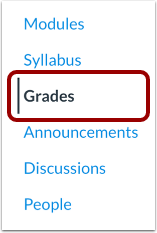
- In the Course Navigation Menu on the left, please select Grades:
- On the top right of the Gradebook screen, please select Export
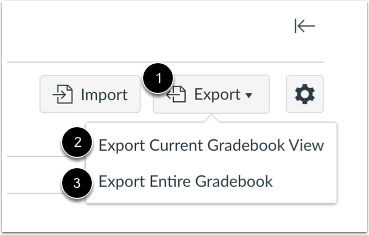
From here you have the option to Export:
2) The current Gradebook view
3) The entire Gradebook
*Note: Both options will generate a .csv file with a breakdown of your respective Gradebook.
💡 Quick Tip
- Both options will generate a .csv file with a breakdown of your respective Gradebook.
Details
Details
Article ID:
5502
Created
Fri 5/8/26 12:50 PM
Modified
Fri 5/8/26 12:50 PM